Guide to Business Device Buyback
Every IT refresh leaves the same question behind: what happens to the devices coming off desks, out of meeting rooms and back from remote staff? A clear guide to business device buyback helps turn that question into a controlled process. Done well, buyback recovers value, protects data and keeps usable hardware in circulation for longer.
Too often, organisations treat end-of-life equipment as an admin task. Devices get stacked in storage, asset records drift out of date and resale value drops month by month. The commercial loss is one problem. The bigger issue is that unmanaged hardware creates risk – especially when laptops, tablets and desktops still contain business data or cannot be clearly tracked.
What business device buyback actually means
Business device buyback is the structured sale of used IT equipment from an organisation to a specialist buyer. That usually includes laptops, desktops, tablets, monitors and related business hardware. The buyer assesses the equipment, confirms condition, handles secure processing and offers a price based on model, age, specification, cosmetic grade and current resale demand.
This is not the same as informal trade-in or consumer resale. In a business setting, the process sits alongside IT asset disposition, device lifecycle planning and compliance requirements. The goal is not only to sell surplus hardware, but to do it with proper data handling, reporting and operational control.
For schools, charities and businesses with mixed fleets, buyback can also simplify refresh cycles. Rather than replacing hardware and then working out disposal later, the outgoing estate becomes part of the planning model from the start.
Why a guide to business device buyback matters
The value of used business IT is time-sensitive. A three-year-old business laptop from Dell, HP, Lenovo or Apple may still have strong resale demand if it is collected, tested and processed quickly. Leave the same device in storage for another year and the market shifts. Battery condition declines, cosmetic issues increase and supported operating system windows get tighter.
That is why buyback works best as a lifecycle decision, not a clean-up exercise. If your organisation already knows when devices are likely to be replaced, you can plan collection, auditing and resale before values soften.
There is also a sustainability case, but it needs to be practical. Reuse only works when equipment is suitable for refurbishment and redeployment. Some assets will retain strong secondary value. Others may be better suited to parts harvesting or responsible recycling. A good provider will be clear about that trade-off rather than promising maximum returns on every item.
Which devices are usually suitable
Most programmes focus on portable and desk-based computing hardware. Business laptops are often the strongest category because demand for refurbished units remains steady across business, education and home working use cases. Tablets can also perform well, particularly recent Apple iPad and Microsoft Surface models in clean condition.
Desktops and small form factor PCs can still hold value, though this depends more heavily on processor generation, RAM, storage type and Windows compatibility. Monitors may be included, but resale economics are more sensitive to size, panel type, brand and transport costs. Older accessories, low-spec peripherals and heavily worn hardware may add little buyback value even if they can still be processed.
The detail matters. A fleet of consistent, business-grade Lenovo ThinkPads or HP EliteBooks is much easier to value and resell than a mixed batch of consumer devices with patchy records. Standardisation helps on both sides.
What drives buyback value
Age is only one factor. Market demand matters just as much. A well-kept device with a current-generation processor, SSD storage and business-class build quality will usually outperform a newer but lower-spec unit. Buyers also look at battery health, screen condition, keyboard wear, BIOS locks, missing chargers and whether devices power on reliably.
Specification consistency can increase value across a batch. If 200 laptops share the same model, memory and storage profile, refurbishment and resale are more efficient. If every unit is different, processing costs rise and so does pricing uncertainty.
Documentation also affects outcomes. Asset lists with serial numbers, model details and basic condition notes speed up valuation. Missing records do not always prevent buyback, but they tend to slow the process and create more room for later adjustment.
Data erasure is not a side note
No guide to business device buyback is complete without data security at the centre. Before any device leaves your control, the process for data sanitisation needs to be defined. That means more than deleting files or resetting a user account.
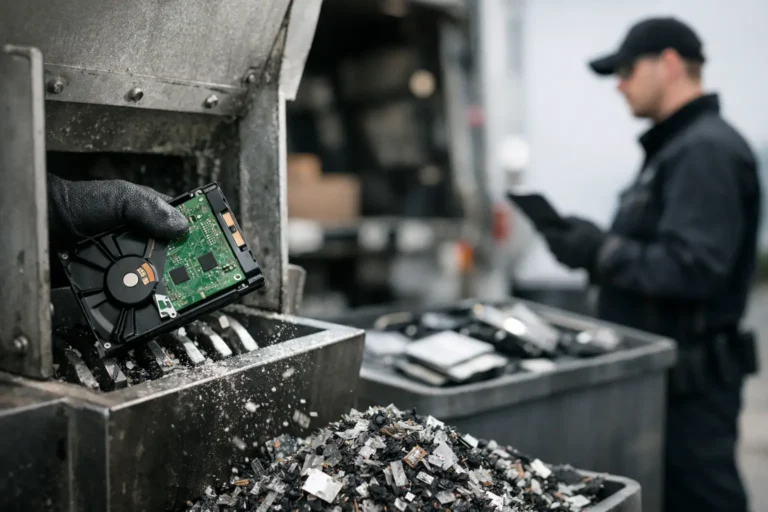
For most organisations, the safest route is to use a specialist partner that provides verified data erasure, audit trails and reporting at asset level. In some cases, drives may be wiped to recognised standards and reused. In others, physical destruction may be required because of policy, sector obligations or drive condition. The right approach depends on your risk profile and internal governance.
What matters is consistency. If half a fleet is wiped internally and the rest is handled externally without proper records, accountability gets blurred. For regulated organisations and public sector teams, that is usually where problems start.
How the buyback process should work
A strong process is straightforward. First comes asset identification. The organisation provides an inventory or arranges an audit so devices can be counted and matched to make, model and specification. Then comes an indicative valuation based on current secondary market conditions.
After that, logistics and collection need to be planned properly. Packaging, chain of custody and site access all matter, particularly for multi-site estates or collections from remote workers. Once devices arrive for processing, they are checked, graded, data-erased and tested. Final pricing is then confirmed against the actual condition and asset count.
This is where transparency matters. If pricing changes after inspection, the reason should be specific – cracked screens, activation locks, battery failure, missing units or lower specs than declared. Vague deductions are a warning sign.
Common friction points to avoid
The biggest issue is delay. Hardware parked in cupboards loses value and often loses traceability as well. Staff changes, office moves and incomplete records make later recovery harder.
The second is overestimating condition. Internal teams often classify devices as good because they still work, while resale grading takes a stricter view of casing wear, keyboard polish, screen pressure marks and battery performance. That difference does not mean the buyer is being difficult. It means the resale market has standards.
The third is ignoring low-value assets until they create a logistics problem. Not everything will generate a strong return. Even so, bundling lower-value items into a structured collection can still make sense if it clears storage, reduces admin and supports environmental reporting.
Choosing the right buyback partner
Price matters, but it should not be the only test. The right provider should understand enterprise and education hardware, offer secure processing and be able to manage volume without turning the project into a long email chain.
Ask how valuations are produced, how data erasure is verified and what happens to devices that fail testing. Some buyers focus only on easy-to-resell stock. Others can support refurbishment, parts recovery and broader lifecycle handling. That difference affects both recovery rates and operational ease.
UK organisations should also look for practical capability: collection planning, asset-level reporting, grading discipline and a clear route from receipt to settlement. Refurb X Connect operates in that space, where secure processing and resale execution need to work as one flow rather than as separate services.
When buyback may not be the best route
It depends on the estate. If devices are extremely old, damaged beyond economical repair or locked by policy restrictions that prevent reuse, direct buyback value may be limited. In those cases, the better outcome may be compliant recycling, component harvesting or internal redeployment for lower-demand roles.
There are also cases where donation makes more sense than resale, particularly for organisations with specific social value goals. But even then, the same controls should apply. Data handling, testing and asset records still matter.
Build buyback into the refresh cycle
The best results usually come when buyback is planned before replacement devices arrive. That gives IT teams time to audit the outgoing estate, separate reusable stock from scrap, gather chargers and power supplies, and align collections with deployment schedules.
It also improves budgeting. Instead of treating residual value as a bonus, organisations can forecast likely recovery and use that to support procurement decisions. The exact return will always depend on market conditions and device quality, but a structured process is still better than guessing.
If your business runs laptops for three to four years, or your school refreshes classroom devices on a rolling basis, buyback should not sit at the end of the chain. It should sit in the middle of the lifecycle plan, where value recovery, secure data erasure and refurbishment all connect.
A good buyback programme does not just clear old equipment. It gives your IT estate a cleaner exit path, which usually means better control at the next refresh as well.