What Is ITAD and How Does It Work?
A device refresh should not end with a pile of retired laptops in a store cupboard or a rushed trip to the recycler. For most organisations, that is where the risk starts. Data still sits on drives. Asset records go out of date. Equipment with resale value gets written off too early. ITAD exists to stop that.
What is ITAD and how it works
ITAD stands for IT Asset Disposition. It is the structured process of retiring, handling, reusing, reselling, recycling, or destroying IT equipment in a way that protects data, meets compliance requirements, and recovers as much value as possible.
If you are asking what is ITAD and how it works in practice, the short answer is this: an organisation identifies surplus or end-of-life devices, those assets are collected and logged, data is securely erased or destroyed, hardware is tested and graded, then it is either redeployed, refurbished for resale, broken down for parts, or recycled through the correct channels.
That sounds straightforward, but the detail matters. A proper ITAD process sits at the point where security, operations, finance, and sustainability all meet. Get it right and you reduce risk while extending the life of your hardware. Get it wrong and you create exposure on several fronts at once.
Why ITAD matters more than most teams expect
The obvious concern is data security. Laptops, desktops, servers, mobiles, and storage devices often leave service with company data still present. That may include employee records, customer information, financial files, saved credentials, or system access details. Deleting files or reformatting a device is not the same as verified sanitisation.
There is also the value question. Many businesses replace devices on a cycle and assume old hardware has little worth. In reality, some assets retain useful resale value, especially when they are processed quickly, tested correctly, and channelled into refurbishment or secondary markets before condition drops further.
Then there is environmental pressure. Businesses, schools, and public sector organisations are under more scrutiny around waste, procurement, and carbon impact. Throwing away usable equipment is hard to justify when refurbishment and redeployment may still be viable.
ITAD is not only for large enterprises. Any organisation with a device estate can benefit from a controlled process. The scale changes, but the principles do not.
The core stages of the ITAD process
A strong ITAD programme follows a chain of custody from the moment equipment is marked for retirement through to its final outcome. That chain is what creates accountability.
1. Asset identification and collection
The process starts with a review of which devices are leaving service. That may happen during an IT refresh, office move, lease return, school replacement cycle, or consolidation project. Each item should be identified against an asset register where possible, including make, model, serial number, and condition.
Collection matters more than it looks. Devices need to be packed, transported, and received in a way that avoids loss, damage, or a break in tracking. If equipment moves without proper logging, the organisation loses visibility before the real work has begun.
2. Audit and intake
Once the assets arrive at a processing site, they are booked in and checked. This intake stage confirms what has been received and often highlights mismatches between the client list and the actual shipment.
At this point, the provider begins to separate hardware by type and likely outcome. Some devices are good candidates for reuse. Others are only suitable for parts recovery or recycling. Age, specification, physical condition, and market demand all affect that decision.
3. Data sanitisation or destruction
This is the stage most buyers and IT managers focus on, and for good reason. Data-bearing devices need secure treatment before any further handling. Depending on the asset type and the client requirement, that may involve certified software erasure, degaussing in certain cases, or physical destruction of the drive.
The right method depends on the media, the device’s future use, and the organisation’s security policy. If a laptop can be securely wiped and reused, that usually preserves more value than destroying the storage outright. But in higher-risk environments, physical destruction may be the correct call. ITAD is full of these trade-offs. Maximum value recovery and maximum destruction do not always point in the same direction.
4. Testing, grading, and refurbishment
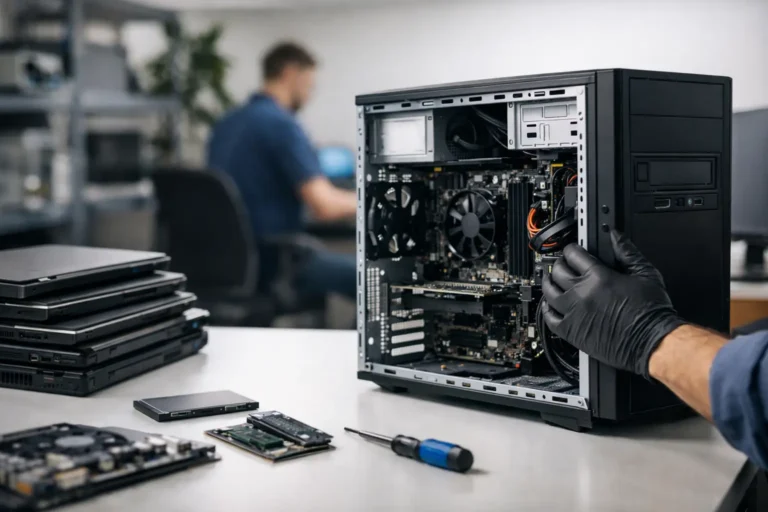
Once data has been handled, viable equipment can be tested. This includes checking functionality, battery health where relevant, cosmetic condition, and any faults that affect usability or resale.
Grading helps decide what happens next. A device in good condition may be redeployed internally with minor work. Another may need replacement parts, cleaning, and reimaging before resale. A third may have no practical resale route but still hold value as a donor for components.
This is where refurbishment can make a real difference. Good ITAD is not simply disposal with paperwork. It is often a decision engine for extending asset life.
5. Redeployment, resale, recycling, or destruction
At the end of the process, each device should move into a defined channel. The best outcome is usually reuse, either within the original organisation or through resale after refurbishment. Reuse keeps equipment in circulation and typically delivers the strongest balance of financial and environmental return.
If the hardware is no longer fit for use, parts harvesting may still recover value. After that, compliant recycling is the final route. Anything that cannot be reused should be broken down responsibly, with hazardous materials and recoverable commodities handled correctly.
6. Reporting and certification
A proper ITAD process ends with documentation. That may include asset reports, serial number reconciliation, data erasure certificates, destruction records, and financial reporting on recovered value.
For organisations with compliance obligations, this paperwork is not optional. It is the evidence that retired equipment was managed correctly.
What good ITAD looks like in practice
The best ITAD programmes are predictable, auditable, and commercially sensible. They do not treat every device the same way. Instead, they apply a process that matches the asset, the data risk, and the likely value outcome.
For example, a school clearing a few hundred ageing laptops may prioritise quick collection, secure erasure, and low-friction resale or recycling. A financial services firm may place heavier weight on documented chain of custody and stricter destruction requirements. A reseller or managed service provider may focus on refurbishment yield, parts recovery, and turnaround speed.
That is why ITAD should not be viewed as a one-size-fits-all disposal service. The right model depends on the estate you manage and what matters most – speed, compliance, value recovery, sustainability, or all four.
Common mistakes when retiring IT assets
A lot of avoidable problems come from informal handling. Devices are put aside without being logged. Staff assume an in-house reset is enough. Equipment sits unused for months, losing resale value and increasing the chance of loss. Then, when a clear-out finally happens, the organisation has limited visibility over what left the building and in what condition.
Another common mistake is focusing only on end disposal. If the brief is simply to remove old hardware, teams can miss chances to redeploy or refurbish assets that are still perfectly useful. Disposal may feel tidy, but it is not always efficient.
There is also the risk of choosing on price alone. Low-cost collection means very little if tracking is weak, reporting is incomplete, or data handling cannot be evidenced properly. ITAD should reduce exposure, not shift it somewhere less visible.
Where refurbishment fits into ITAD
Refurbishment is one of the most useful outcomes inside an ITAD workflow because it turns retired hardware into a working asset again. That may mean internal redeployment to another user group, resale into secondary markets, or supply into education, channel, and trade-in programmes.
For organisations trying to reduce waste and stretch IT budgets, this matters. A device does not need to be brand new to be reliable. It needs to be tested properly, restored to a defined standard, and moved through a controlled process.
That is the practical advantage of an integrated model. When collection, diagnostics, data handling, repair, grading, and onward distribution are connected, there is less friction and less value lost between stages. That is also where a service-led partner such as Refurb X Connect fits best – not as a single repair point, but as a coordinated route from retired hardware to a clear next use.
Who should think about ITAD now
If you manage a fleet of laptops, desktops, tablets, servers, or mobile devices, ITAD is relevant. It is especially relevant if you are approaching a refresh cycle, dealing with surplus stock, closing a site, or holding equipment that has simply sat too long without a plan.
You do not need a huge estate to need control. Even smaller batches can carry data risk, compliance pressure, and missed recovery value. The question is not whether old hardware needs to leave your environment. The question is whether it leaves through a process you can trust.
The most useful starting point is simple: know what you have, know what data sits on it, and know what outcome you want from each asset class. Once that is clear, ITAD stops being an end-of-life problem and becomes part of smarter lifecycle management.
Old devices are only waste when the process around them is weak.