What Happens to Data on Refurbished Laptops?
Buying a refurbished laptop is usually a value decision. For many buyers, the real question sits behind the spec sheet: what happens to data on refurbished laptops before they are sold, redeployed or passed into a new estate? That question matters just as much for a home user as it does for an IT manager handling hundreds of devices.
The short answer is that any professional refurbishment process should treat existing data as a controlled risk, not a side issue. If a laptop is handled properly, the previous owner’s files, accounts, credentials and stored business information should be securely erased before the device reaches its next user. If it is handled poorly, sensitive data can remain recoverable even when the machine looks reset and ready to use.
What happens to data on refurbished laptops in practice
There is a big difference between a laptop that has been reset and one that has been sanitised. A factory reset or a quick reinstall may remove visible user accounts and files from the operating system, but that does not always mean the underlying data is gone. In some cases, deleted files can still be recovered with the right tools.
A proper refurbishment workflow usually includes formal data erasure as part of intake and processing. That means the storage device is identified, checked, erased using an approved method, and then verified. On some units, the original drive is retained and securely wiped. On others, especially where the drive has faults or does not meet the target standard, it may be destroyed and replaced.
For businesses and public sector organisations, this distinction is not minor. It affects compliance, internal risk, client confidentiality and chain of custody. A refurbished device is only as trustworthy as the process behind it.
Resetting is not the same as secure erasure
This is where confusion often starts. Many people assume that if a laptop boots to a fresh Windows setup screen, all previous data has been removed. That is not always true.
A standard reset can leave data remnants behind, particularly on older hard drives or where only file system references have been removed. Even a clean operating system install can fail to address hidden partitions, recovery areas or residual blocks of data. That may be acceptable for a personal device staying in the same household. It is not enough for professional refurbishment.
Secure erasure goes further. The process depends on the type of storage involved. Traditional hard drives and solid-state drives behave differently, so the erasure method has to match the media. A blanket approach is not reliable.
How professional data wiping usually works
In a structured refurbishment environment, data handling starts before cosmetic work or resale preparation. The device is logged, assessed and assigned into a controlled process. Storage media is then checked for type, health and any sign that it needs separate handling.
On a conventional hard drive, secure overwrite methods are commonly used to replace existing data patterns so the old content cannot be reconstructed through normal recovery tools. On an SSD, the preferred route is often a secure erase command built for flash storage, because simple overwriting does not always affect every physical cell in the same way.
Verification matters as much as the erase itself. A technician or platform should confirm that the wipe completed successfully and that the drive is suitable for reuse. If verification fails, the drive should not move forward into resale or redeployment as if the job is finished.
This is why bulk refurbishment for organisations needs process discipline. One missed drive in a fleet collection can create a disproportionate problem.
When drives are removed instead of wiped
Not every laptop keeps its original storage. Sometimes the safest or most efficient option is to remove the drive completely.
That usually happens in three scenarios. The first is drive failure, where the media is unstable and cannot be erased reliably. The second is policy-driven handling, where a client requires all original drives to be retained or destroyed regardless of condition. The third is upgrade-led refurbishment, where the original drive is replaced to improve performance or standardise the next deployment.
In those cases, the removed drive should be tracked and either destroyed through a documented process or returned under agreed controls. Simply taking it out is not enough. The data risk moves with the drive.
What buyers should expect from a refurbished laptop
If you are buying a refurbished laptop from a credible source, you should expect the device to arrive without any previous user data, active accounts or business information left behind. You should also expect that the operating system has been prepared for a fresh user setup, not handed over with traces of the last owner’s environment still present.
For business buyers, schools and resellers, it is reasonable to ask how data sanitisation is handled. You do not need a dramatic technical answer. You need a clear one. Was the drive securely erased, verified, replaced or destroyed? Is there a documented process behind it? Can that process scale across multiple units, not just one-off jobs?
A reliable refurbishment partner should be able to answer those questions without hesitation.
Risks when the process is weak
The main risk is obvious: recoverable data. That could mean personal photos and saved passwords on a consumer device, or customer records, financial documents and internal files on a business asset.
There are other issues as well. Weak handling often points to wider process gaps. If data sanitisation is vague, quality control may also be inconsistent. Devices may be cleaned cosmetically but not technically prepared to a defined standard. For fleet operators, that creates friction later through setup problems, mismatched configurations and avoidable support tickets.
Low-cost refurbished stock can look attractive until you factor in those hidden costs. Price only tells part of the story. Process is what determines whether the device is actually fit for reuse.
What happens to data on refurbished laptops from business collections
The stakes are higher when laptops come from corporate refresh cycles, school estates or managed IT environments. These devices often contain more than local files. They may hold cached emails, browser sessions, remote access credentials, line-of-business data, and information subject to retention or privacy obligations.
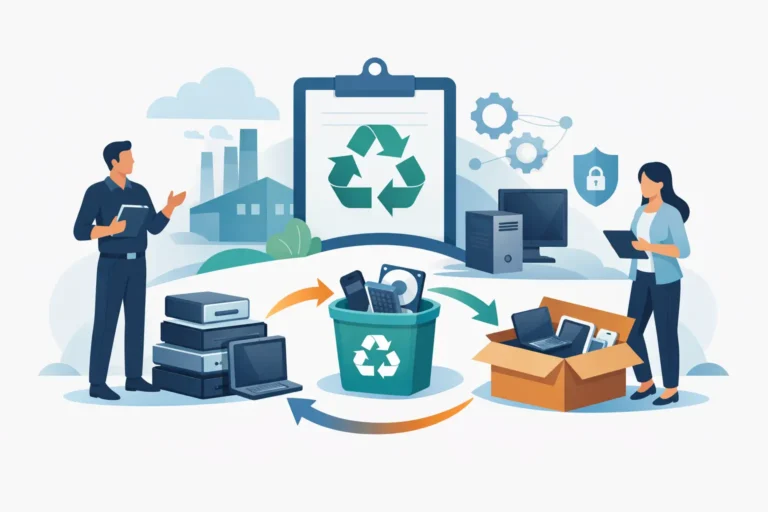
That is why collection and intake matter. Data security does not begin at the wipe station. It begins when devices leave the client site. Logging assets, maintaining chain of custody and separating devices into the right workflow all reduce the chance of loss, mix-up or improper handling.
For organisations managing disposals at volume, the question is not just what happens to data on refurbished laptops, but who is accountable at each stage. A joined-up process is usually safer than splitting collection, wiping, repair and resale across several providers. It removes handoff risk and gives one point of control.
SSDs, encryption and the details that change the answer
There is no single rule that covers every laptop. Storage type, age, device condition and existing security controls all affect the correct treatment.
For example, if a laptop was encrypted properly before collection, the exposure risk is lower while the device is in transit or awaiting processing. That said, encryption is not a substitute for sanitisation. The drive still needs to be erased or destroyed before the device changes hands.
SSDs also require more care than many buyers realise. Because of how flash storage manages data across cells, old assumptions from mechanical drives do not always apply. A refurbisher who treats every storage device the same way may be cutting corners, even if the laptop appears ready for sale.
Why this matters for redeployment, not just resale
Data handling is not only a resale issue. It matters just as much when a laptop stays within the same organisation and is reassigned to a new user.
Internal redeployment often gets less attention because the device never technically leaves the business. Even so, a finance laptop passed to a starter in operations should not retain cached data, browser history, stored credentials or local files from its previous role. The same standard applies. New user means clean device.
This is where an operational service model helps. Refurb X Connect is built around linking collection, diagnostics, data handling, repair and redeployment into one controlled workflow, which reduces the gaps that usually appear when those steps are managed separately.
The practical question to ask before you buy or refresh
Do not ask only whether a laptop has been “wiped”. Ask what that means in the provider’s process.
A serious answer should cover method, verification and exceptions. It should explain what happens if the drive fails, what standard is followed for reuse, and how assets are tracked from intake to release. If the answer stays vague, assume the process is vague too.
The refurbished market works well when data handling is treated as part of the product, not an afterthought. A clean device is not just one that looks presentable and boots correctly. It is one that has been processed with enough control that the next user can start fresh without inheriting someone else’s risk.
That is the real test. If you are trusting a refurbished laptop with your work, your users or your organisation’s data, the invisible part of the process matters most.